Servo Alarm Codes on Cutting Machine: Common Causes & Manufacturer Guide
Most servo alarms are not hardware failures.
Servo alarm codes on a cutting machine typically indicate wiring looseness, parameter mismatches, or mechanical binding rather than permanent motor damage. Immediate resolution involves checking feedback cable continuity, verifying voltage settings against driver parameters, and inspecting rails for physical obstruction.
The smell of burnt cardboard still lingers in my memory from that afternoon in Suzhou. A packaging factory was rushing a large order of corrugated boxes when their CNC oscillating knife cutter suddenly halted. The display flashed a servo overload code. The operator assumed the motor had burned out due to unstable grid voltage. We spent half a day waiting for a replacement part, only to find the issue was a loose feedback connector hidden behind the control panel. That downtime wasted an entire batch of material. Since then, I have learned that panic is the enemy of troubleshooting. Understanding the logic behind Servo Alarm Codes Cutting Machine systems turns a potential disaster into a minor adjustment.

When the blade stops mid-cut, the instinct is to blame the most expensive component. However, the servo system is designed to protect itself. It triggers an alarm when it detects conditions that could lead to damage, such as excessive current, position deviation, or overvoltage. By decoding these signals correctly, operators can restore production quickly without unnecessary part replacements.
What Do Common Servo Alarm Codes Mean?
Alarm codes are diagnostic messages, not death sentences for your hardware.
Servo drives communicate specific errors through alphanumeric codes. Misinterpreting these can lead to incorrect repairs. For instance, an overload alarm often suggests the motor is working too hard, but it rarely means the motor itself is faulty. Instead, it points to an external resistance or electrical inconsistency.
| Alarm Type | Typical Cause | Physical Symptom |
|---|---|---|
| Overload | Mechanical binding or excessive load | Motor hums but does not move |
| Overvoltage | Regenerative energy or wrong voltage setting | Sudden stop during deceleration |
| Encoder Error | Loose feedback cable or interference | Jittery movement or position loss |
| Position Deviation | Gain mismatch or obstacle | Knife deviates from programmed path |
In a leather workshop case, high-speed curve cutting caused frequent jittering and alarms. The operator reduced the speed significantly, impacting throughput. Upon inspection, the encoder cable shield was damaged, allowing electromagnetic interference from nearby motors to corrupt position data. Replacing the cable resolved the issue without changing any drive parameters. This highlights why understanding CNC oscillating knife cutter servo overload causes is critical for maintaining efficiency.
Another common misconception involves voltage. Higher voltage is not always better. If a driver is set for 380V but receives 220V, or vice versa, it will trigger overvoltage or undervoltage alarms immediately. These parameters must match the local power supply exactly.
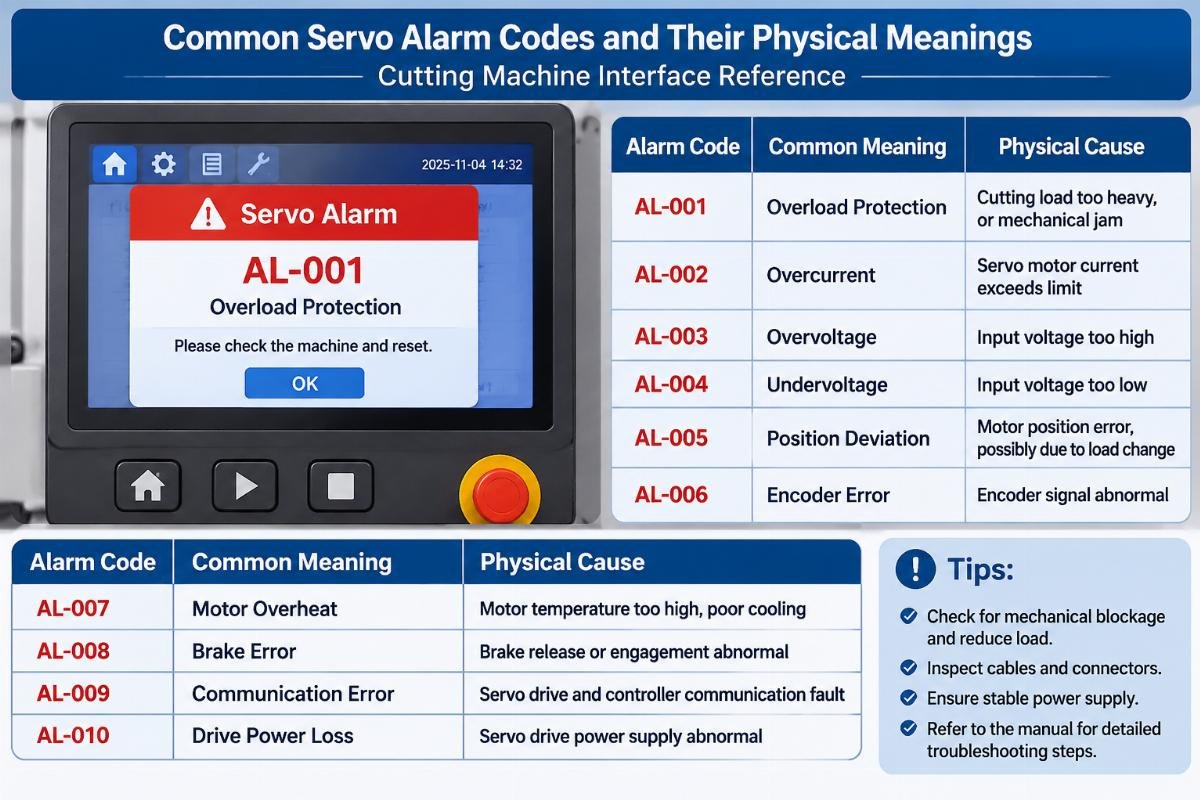
Recognizing the pattern behind the code saves time. An overload during acceleration suggests inertia issues, while an overload during constant speed suggests friction. An encoder error that appears intermittently usually points to wiring rather than the sensor itself.
How to Check Wiring and Connections?
Loose connections are the primary cause of intermittent servo faults.
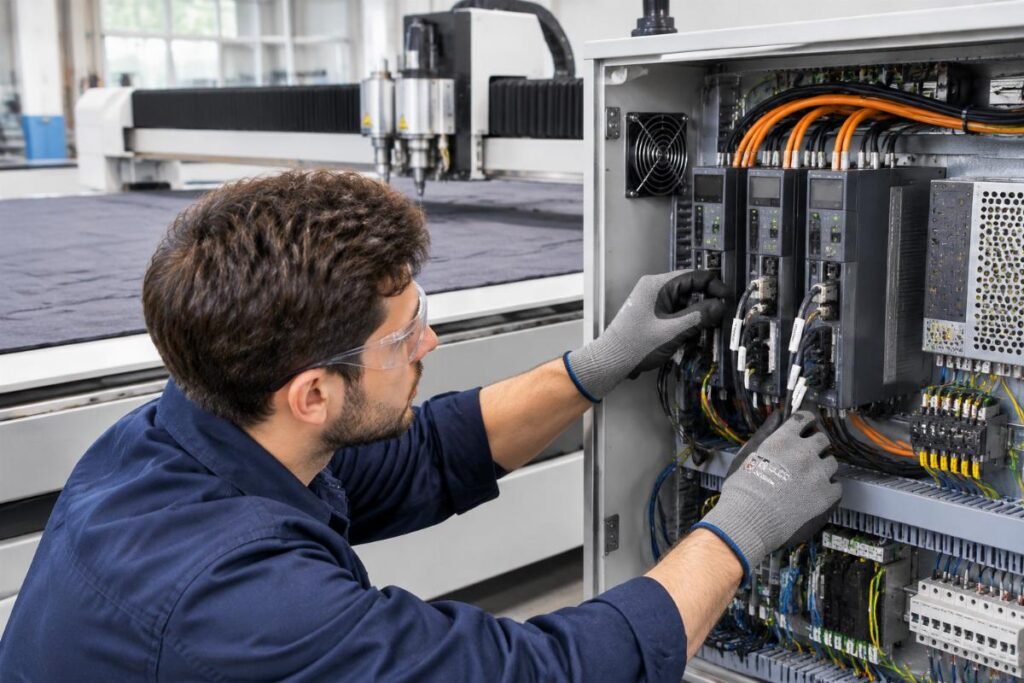
Before opening the servo drive or replacing the motor, inspect the physical links between components. Vibration from the oscillating knife mechanism can gradually loosen terminals over time. A systematic check prevents unnecessary downtime.
- Power Down and Lock Out: Ensure the machine is completely disconnected from power to avoid electric shock.
- Inspect Feedback Cables: Check the encoder cables connecting the motor to the drive. Look for pinched wires, broken shields, or loose connectors. Use a multimeter to test continuity if visual inspection is inconclusive.
- Verify Power Terminals: Tighten all main power input terminals on the servo drive. Loose phases can cause current imbalance, triggering overload alarms.
- Check Grounding: Ensure the servo motor and drive are properly grounded. Poor grounding leads to noise interference, causing erratic behavior and false alarms.
- Examine Motor Connectors: Inspect the U, V, W phase wires at the motor end. Corrosion or loose contacts here increase resistance, leading to overheating and alarms.
A packaging manufacturer recently experienced random stops during long runs. The error log showed repeated encoder errors. After following these steps, we found that the feedback cable rubbed against a moving rail, wearing down the insulation. The exposed wires shorted occasionally, confusing the drive. Securing the cable with proper clips eliminated the problem. This practical approach to vibrating knife cutting machine error codes troubleshooting avoids guesswork.

Wiring issues are often invisible until they cause a fault. Regular preventive checks, especially in high-vibration environments like oscillating knife cutting, extend the life of the electrical system.
Why Do Parameter Mismatches Trigger Alarms?
Incorrect settings can simulate hardware failure.
Servo drives require precise configuration to match the motor and load. Default settings may not suit every application. When parameters such as gain, inertia ratio, or voltage class are mismatched, the drive cannot control the motor effectively, resulting in alarms.
For example, if the inertia ratio is set too low for a heavy cutting head, the drive will struggle to accelerate, triggering an overload alarm. Conversely, setting the gain too high can cause oscillation, leading to position deviation errors. In an automotive mat manufacturing facility, a voltage fluctuation caused the machine to alarm. The recovery required not just resetting the drive, but verifying that the voltage tolerance parameters were aligned with the local grid stability.
| Parameter | Effect of Incorrect Setting | Recommended Action |
|---|---|---|
| Inertia Ratio | Overload during acceleration/deceleration | Adjust to match actual load mass |
| Voltage Class | Overvoltage/Undervoltage alarms | Confirm match with power supply |
| Position Gain | Position deviation or oscillation | Tune based on rigidity and load |
| Current Limit | Premature overload trips | Set according to motor nameplate |
Realtop Machinery supports customers with remote diagnostics to align these parameters accurately. Their 24/7 technical support helps identify whether a fault stems from a setting error or a physical issue, ensuring rapid resolution. This service is particularly valuable for international buyers who may lack immediate access to specialized technicians. Understanding these nuances is key when dealing with Servo Alarm Codes Cutting Machine issues.

Parameter mismatches are subtle. They do not always produce obvious physical signs like smoke or sparks. Instead, they manifest as performance degradation and frequent alarms. Regularly reviewing and backing up parameter sets can save hours of reconfiguration time.
When is it a Mechanical Binding Issue?
Physical resistance forces the servo to work beyond its limits.
If wiring and parameters are correct, the problem likely lies in the mechanical system. The servo motor generates torque to move the knife. If something blocks this movement, the current spikes, and the drive trips an overload alarm.
Common mechanical causes include:
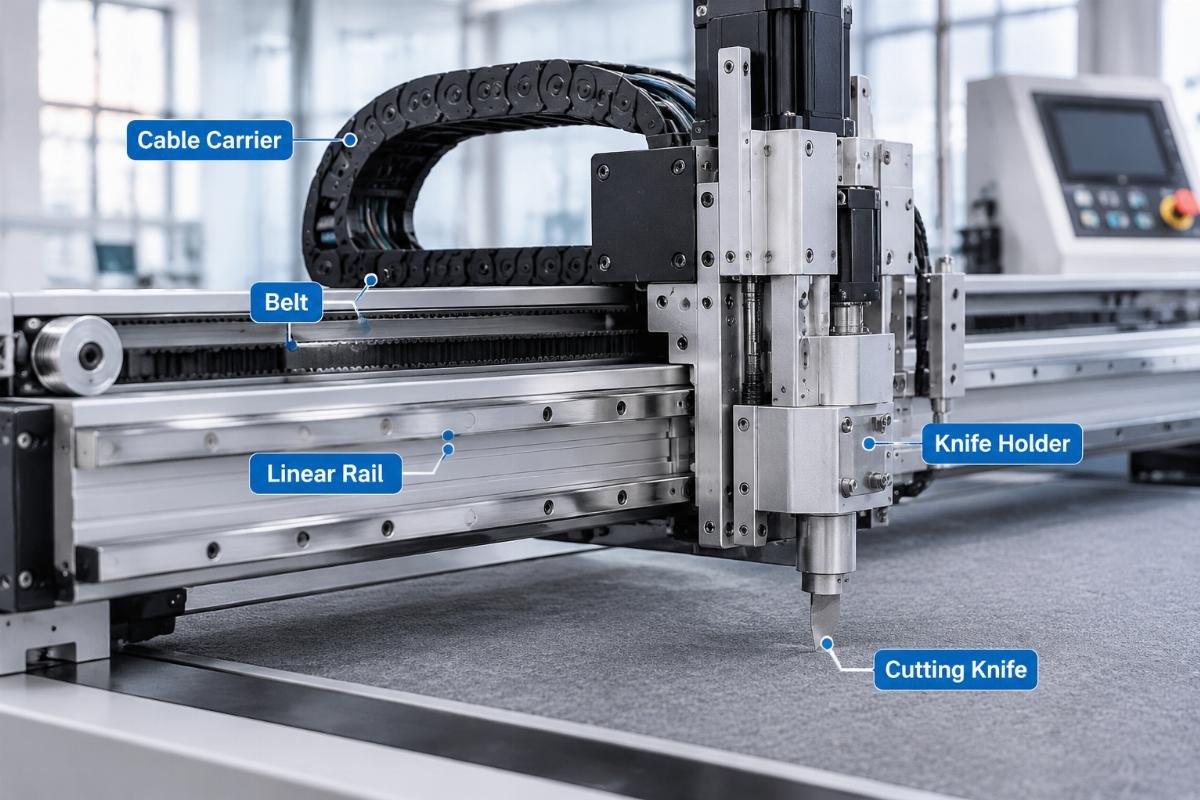
- Rail Obstruction: Debris, offcuts, or damaged bearings on the linear guides create friction.
- Belt Tension: Over-tightened belts increase load on the motor. Loose belts cause slip and position errors.
- Knife Penetration Depth: Setting the knife too deep into the cutting mat increases resistance significantly.
- Coupling Misalignment: Misaligned couplings between the motor and gearbox cause uneven loading and vibration.
In a fabric cutting scenario, layers of material shifted during cutting, jamming the knife holder. The servo attempted to push through, tripping the overload alarm. Clearing the jam and adjusting the material hold-down vacuum resolved the issue. This demonstrates that Servo Alarm Codes Cutting Machine alerts often point to process errors rather than machine defects.
Regular cleaning of rails and belts, along with proper lubrication, prevents most mechanical binding issues. Operators should also verify that the knife length is appropriate for the material thickness to avoid excessive drag.
Mechanical issues are often audible. Unusual noises during movement can indicate binding before an alarm occurs. Listening to the machine provides an early warning sign.
Conclusion
Servo alarms are solvable with logical troubleshooting.
Most servo faults on cutting machines stem from simple issues like loose wires, incorrect parameters, or mechanical obstructions. By systematically checking these areas, operators can minimize downtime and avoid unnecessary repairs. Understanding the root cause of Servo Alarm Codes Cutting Machine alerts empowers manufacturers to maintain consistent production quality.